Thursday, 1 January 2026

The Mindset Behind Reliable Data Systems

I’ve been in data engineering long enough to see the stack change many times over.

Tools come and go.
Architectures get renamed.
What was “best practice” five years ago quietly disappears.

What hasn’t changed is how experienced data engineers think.

Here are a few lessons that only became obvious to me after years of building and fixing data systems at scale.


Start with the decision, not the design.

Early in my career, I focused on building impressive pipelines. Over time, I learned that a pipeline without a clear consumer is just movement, not progress. Every system should exist to support a decision. If you can’t name that decision, you’re not ready to design anything yet.


Assume the data will change — and plan for it.

Schemas evolve. Definitions drift. Upstream teams refactor without telling you. This isn’t bad engineering; it’s reality. Strong data systems don’t rely on stability — they’re built to adapt. Validation, observability, and recovery matter more than perfect assumptions.


Treat data like a product, not a side effect.

A pipeline that runs on schedule but produces confusing or untrusted data has failed. Data engineers don’t just deliver tables; they deliver clarity. If your users don’t know what the data means or when to trust it, the work isn’t done.


Optimize for understanding before optimization.

I’ve debugged enough production issues to know that the fastest system isn’t always the best one. When something breaks, the ability to trace, explain, and fix the problem quickly matters far more than shaving milliseconds off a job. Simple systems survive longer.


Be honest about tradeoffs.

There is no perfect architecture. Every choice trades cost, latency, flexibility, or correctness. Mature engineers don’t hide these tradeoffs — they communicate them clearly so the business can make informed decisions.


Build for the next engineer, not just yourself.

You won’t always be there to explain what you built. Clear structure, naming, and documentation aren’t nice-to-haves — they’re how systems scale beyond individuals. If a new engineer can understand your work without a meeting, you’ve done your job well.


After nearly two decades in this field, one thing is clear to me:

Data engineering isn’t about moving data faster.
It’s about making complexity manageable and decisions dependable.

Everything else is just an implementation detail.


Wednesday, 20 May 2020

Airflow SparkSubmitOperator example

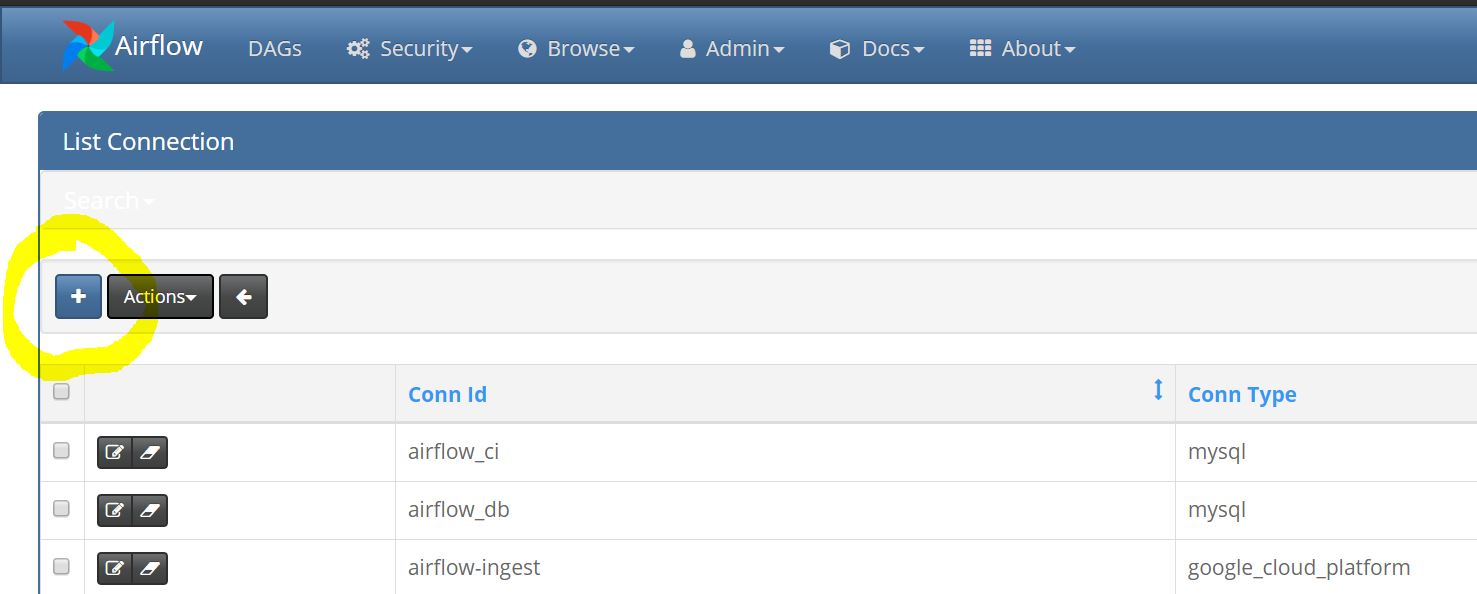
Creating a connection


Note:
  • config values passed from SparkSubmitOperator takes precedence over the connection parameters. 
  • Using the spark-home in extra properties will work for all versions in case of multiple spark installations
  • default deployment mode is client. Adding 'deploy-mode':'cluster' in extra properties will change it to cluster mode

Thursday, 23 April 2020

Reflect function in Hive and Spark SQL

Reflect function:

A Java class and method often exists to handle the exact function a user would like to use in Hive. Rather than having to write a wrapper UDF to call this method, the majority of these methods can be called using reflect UDF. Reflect uses Java reflection to instantiate and call methods of objects; it can also call static functions. The method must return a primitive type or a type that Hive knows how to serialize.


SELECT reflect("java.lang.String""valueOf"1),
       reflect("java.lang.String""isEmpty"),
       reflect("java.lang.Math""max"23),
       reflect("java.lang.Math""min"23),
       reflect("java.lang.Math""round"2.5),
       reflect("java.lang.Math""exp"1.0),
       reflect("java.lang.Math""floor"1.9)
FROM src LIMIT 1;
1   true    3   2   3   2.7182818284590455  1.0

SHA256 encoding using Java's DigestUtils and reflect method in Hive:


hive> SELECT Reflect('org.apache.commons.codec.digest.DigestUtils', 'sha256Hex', 'HANU');
OK
72102548c156fe16ed7ff108def7ddf19332d510b0afc29749a83dfd47787077
If we pass NULL value to above method, it throws exception

hive> SELECT Reflect('org.apache.commons.codec.digest.DigestUtils', 'sha256Hex', NULL);
OK
Failed with exception java.io.IOException:
org.apache.hadoop.hive.ql.metadata.HiveException: UDFReflect getMethod
20/04/23 11:00:05 ERROR CliDriver: Failed with exception 
java.io.IOException: org.apache.hadoop.hive.ql.metadata.HiveException: UDFReflect getMethod
        at org.apache.hadoop.hive.ql.exec.FetchTask.fetch(FetchTask.java:154)
        at org.apache.hadoop.hive.ql.Driver.getResults(Driver.java:1693)
        at org.apache.hadoop.hive.cli.CliDriver.processLocalCmd(CliDriver.java:233)
        at org.apache.hadoop.hive.cli.CliDriver.processCmd(CliDriver.java:165)
        at org.apache.hadoop.hive.cli.CliDriver.processLine(CliDriver.java:376)
        at org.apache.hadoop.hive.cli.CliDriver.executeDriver(CliDriver.java:736)
        at org.apache.hadoop.hive.cli.CliDriver.run(CliDriver.java:681)
        at org.apache.hadoop.hive.cli.CliDriver.main(CliDriver.java:621)
        at sun.reflect.NativeMethodAccessorImpl.invoke0(Native Method)
        at sun.reflect.NativeMethodAccessorImpl.invoke(NativeMethodAccessorImpl.java:62)
        at sun.reflect.DelegatingMethodAccessorImpl.invoke(DelegatingMethodAccessorImpl.java:43)
        at java.lang.reflect.Method.invoke(Method.java:498)
        at org.apache.hadoop.util.RunJar.run(RunJar.java:234)
        at org.apache.hadoop.util.RunJar.main(RunJar.java:148)

Surprisingly Hive handles it using CAST(null as string)

hive> select Reflect('org.apache.commons.codec.digest.DigestUtils', 'sha256Hex',
cast(null as string));
OK
UDFReflect evaluate java.lang.reflect.InvocationTargetException 
method = public static java.lang.String org.apache.commons.codec.digest.
DigestUtilssha256Hex(java.lang.String) 
args = [null]
NULL


spark.sql(" select Reflect('org.apache.commons.codec.digest.DigestUtils', 'sha256Hex',cast(null as string))").show()
[Stage 427:>                                                        (0 + 1) / 1]20/04/23 11:25:43 WARN TaskSetManager: Lost task 0.0 in stage 427.0 469): java.lang.reflect.InvocationTargetException
Caused by: java.lang.NullPointerException

Tuesday, 5 November 2019

Spark Notes

    1. Spark is a distributed in memory (mostly) computing framework/processing engine designed for batch and streaming data featuring SQL queries, graph processing and machine learning.
    2. Map Redue is a 2 stage frame work. Spark is multi stage framework operating on DAG.
    3. Why immutable --> to avoid source/raw data modifications, multiple threads can't change the data. RDD can be created at any time in case of failures, caching, sharing and replication
    4. Spark deployment modes - Local, client and Cluster.
      • Client vs Cluster - Driver program is outside of Yarn cluster manager (i.e at client) in client mode.
      • Driver program will be alongside of Application master in Yarn cluster in cluster mode
    5. RDD vs DataFrame vs DataSet:
      1. Use RDD for
        1. low level transformations/actions
        2. When schema is not necessary, ex: accessing columnar format,
        3. When data is unstructured like media streams or steamed text (Spark streaming is available now)

    DataFrame(DF)
    DataSet(DS)
    It is distributed collection of objects of type Row
    It allows users to assign java class to the records inside DF
    Not Type-Safe
    Type-safe (compile time error check)
    Scala, Java, Python and R
    Scala and Java

    Leverages Tungsten’s fast in-memory encoding

    Encoders are highly optimized and use run time code generation to build custom serde. As a result, it is faster than Java/Kyro serialization.

    Comparatively less in size.. Which will improve the network transfer speeds.

    Single interface usable in Java & Scala
    1. Rdd.toDebugString to get RDD lineage graph
    1. Tuning -
      1. Data Serialization:  Use Kyro. But, it doesn't support all serializable types and requires to register the classes. If the objects are large, increase spark.kryoserializer.buffer. If the object is not registered, Kyro will still work. But - it will store full classname with the object which is wasteful
      2. Memory Tuning:
        1. Avoid using String (takes ~40bytes of overhead than raw data) and common collection classes like HashMap, LinkeList etc., (They will have a wrapper object  for each entry).
        2. Prefer to use arrays of objects and primitive types - fastutil library
        3. If you have less than 32 GB of RAM, set the JVM flag -XX:+UseCompressedOops to make pointers be four bytes instead of eight
    Check if there are too many garbage collections by collecting GC stats. If a full GC is invoked multiple times for before a task completes, it means that there isn’t enough memory available for executing tasks.
    -verbose:gc -XX:+PrintGCDetails -XX:+PrintGCTimeStamps to collect GC stats and tuning GC accordingly
    1. Level of parallelism: 2-3 tasks per CPU core is recommended
    2. Memory usage of Reduce Tasks: RDD Serialized persist if possible. Try to reduce shuffles (reduceByKey over groupByKey, coalesce over repartition etc,.
    3. Broadcasting large variables: Broadcast large variables as RDD lookup is O(m) and broadcast is O(1)
    4. Data Locality:
    5. Other considerations:
      1. Use Datasets whenever possible.. Avoid using UDF/UDAF. If there is a need for UDF, implement and extend catalyst's
      2. Akka size  akka.frameSize- Spark message broker for data transfer over n/w.
      3. Check the time taken for execution from stages tab
      4. Check the cache utilization from storage tab.
      5. In spark, JDBC overwrite mode, below actions will be performed - (which is not advisable as we will lose metadata like column constraints)
        1. remove all the metadata like index,PK,FK etc.,
        2. Create table(only col def)
        3. write data
    Better approach(s):
    • collect the data to driver and use standard jdbc tools like scalikejdbc to perform required operation
    • use spark truncate=true property along with overwrite
    • First truncate the table using standard jdbc tools then use append mode
    1. Partition calculation: no.of Executers * no. of Cores
    2. Executors & Memory calculation: https://mylearninginbigdata.blogspot.com/2018/06/number-of-executors-and-memory.html
    memoryOverhead = MAX( driver/executor memory * 0.1, 384) --> default calculation.
    1. spark.driver.supervise can be used to restart the driver automatically in case it fails with non-zero exit code. It is supported in standalone, mesos cluster only
    1. spark.memory.fraction : The lower this is, the more frequently spills and cached data eviction occur.
    2. spark.shuffle.memoryFraction:  If spills are often, consider increasing this value at the expense of spark.storage.memoryFraction.
    1. File formats which one and when **  -->File Formats
    2. Spark v1 vs v2 -
      1. Unified DataFrame and DataSet API
      2. Standard SQL support
      3. SparkSession is the entry point and it subsumes SQLContext and HiveContext.
      4. Improved performance in Accumulator
      5. DF based ML APIs
      6. ML pipeline persistence - Users can now save and load machine learning pipelines and models across all programming languages supported by Spark
      7. Distributing algorithms in R - Added support for Generalized Linear Models (GLM), Naive Bayes, Survival Regression, and K-Means in R.
      8. User-defined functions (UDFs) in R - Added support for running partition level UDFs (dapply and gapply) and hyper-parameter tuning (lapply).
      9. Improved Catalyst optimizer , introduced Tungstun tuning (encode, decode, generate entire code as single function etc.,) and Vectorized Parquet
      10. Spark structured streaming - Rich integration with Batch process
    3. Spark catalog is used to manage views/tables.
      1. Ex: spark.catalog.listTables.show (It will list local tables/views)
      2. Ex: spark.catalog.listTables("global_temp").show (It will list global&local tables/views)
    4. In CSV read - options for mode are - -> permissive, dropmalformed and failfast.
    5. Coalesce can be used to reduce the no.of partitions and it doesn't shuffle the data, however instructs spark to read multiple partitions as one
    6. readStream (provide topic).load(), writeStream(topic,key,value).start()--- watermark("10 min") should be applied on same as aggr column and before aggr.
    7. Code executes on executor only when SPARK APIs are used i.e operations on RDD,DF or DS. All the other code i.e before using sparkSession/context/spark api  or operations on collected data will be executed on driver.
    8. Mistakes to avoid:
      1. Wrong calculation of executors - remember to Consider yarn-memory-overhead as 15-20%
      2. No spark shuffle block size can be greater than 2GB
      3. Default # of partitions used when shuffle is involved is 200. So use re partition of coalesce wisely (spark.sql.shuffle.partitions)
        1. How many partitions? ~256MB per partition
        2. Remember the number 2000 (Spark book keeping limit) if the number of partitions is near to 2000, bump the number
    References:


Wednesday, 8 August 2018

Movie Recommendation engine using SQL

Data Model


Data Model


Query to get the recommendation:

SELECT f.ID, MVE_ID, IF(AVG(IF(Recommended='Y',1,0))>=0.5,'Y','N')
FROM friend_tbl f LEFT JOIN feedback_tbl fb ON f.Frnd_ID = fb.VIEWER_ID GROUP BY f.ID,MVE_ID;

Tuesday, 17 July 2018

When to use RDD, Dataframe and Dataset

When to use RDDs?


  • you want low-level transformation and actions and control on your dataset;
  • your data is unstructured, such as media streams or streams of text;
  • you want to manipulate your data with functional programming constructs than domain specific expressions
  • you don’t care about imposing a schema, such as columnar format, while processing or accessing data attributes by name or column; and
  • you can forgo some optimization and performance benefits available with DataFrames and Datasets for structured and semi-structured data.

When should I use DataFrames or Datasets?


  • If you want rich semantics, high-level abstractions, and domain specific APIs, use DataFrame or Dataset.
  • If your processing demands high-level expressions, filters, maps, aggregation, averages, sum, SQL queries, columnar access and use of lambda functions on semi-structured data, use DataFrame or Dataset.
  • If you want higher degree of type-safety at compile time, want typed JVM objects, take advantage of Catalyst optimization, and benefit from Tungsten’s efficient code generation, use Dataset.
  • If you want unification and simplification of APIs across Spark Libraries, use DataFrame or Dataset.
  • If you are a R user, use DataFrames.
  • If you are a Python user, use DataFrames and resort back to RDDs if you need more control.
Reference:

Thursday, 22 February 2018

Convert single column into multiple in Spark

Consider below Sample JSON which has geo column with latitude and longitude values.
let's convert this into multiple columns dynamically.

{"Name":"Hanu","Address":{"Address1":"11213","Address2":"N TEST BLVD","City":"MIAMI"},"State":"FL"}

Below code will convert the Address into multiple columns
val sample = spark.read.json("/myHome/sample.json")
smaple.select('Name,"$Address.*",'State).show

Code snippet


Friday, 2 February 2018

Pyspark Setup with PyCharm Community edition on Windows

 Spark setup:

  1. Install Java and Python
  2. Download spark from here and extract to a directory C:\ spark-2.3.1-bin-hadoop2.7
  3. Clone the GIT repository winutils. Let’s say it is C:\winutils
  4. Set the system environment variables as below
    HADOOP_HOME=C:\winutils\hadoop-2.7.1
    SPARK_HOME=C:\spark-2.3.1-bin-hadoop2.7
    verify the environment variables from command prompt àecho %SPARK_HOME%
    **Restart the cmd window/computer if required for these variables to take effect
  5. Create a temporary directory for hive. Let’s say the path is C:\tmp\hive
  6. Change the permissions to C:\tmp\hive directory to Full control to everyone (restrict to a specific user if required)
  7. Now run pyspark command in cmd window from SPARK_HOME directory.

Pycharm configuration:

  1. Install pyspark interpreter (File→ Settings→ Project Interpreter →  click on + and search for pyspark Install package


  2. Create a new project called spark-test and create a file called test.py in the project


  3. Write a simple script to read and display records with ‘Spark’ in SPARK_HOME\README.md


  4. Add pyspark libraries to the project

    File→ Settings→ Search for Project Structure→ click on Add Content Root→ select SPARK_HOME\python\lib


  5. Run configuration: 

    Run→ Edit Configuration→ click on + button to add new config → Select Python and configure as below


  6. Execute the program. You should see the results below


Sunday, 21 January 2018

Reading XML files using Hive

Scenario 1:
Consider an XML file as below

<row Id="1" Reputation="100" creationDate="2008-07-31T14:22:31.317" DisplayName="Test 1" LastAccessDate="2016-12-10T22:12:46.367" WebsiteUrl="http://www.joelonsoftware.com/" Location="New York, NY" />
<row Id="2" Reputation="250" creationDate="2008-07-31T14:22:31.317" DisplayName="Test User2" LastAccessDate="2016-12-10T22:12:46.367" WebsiteUrl="http://www.test.com/" Location="Phoenix, AZ"  Age="25"/>

Download Jar:

From Hive CLI/Beeline:

add jar <above_jar_location>;

CREATE EXTERNAL TABLE test_xml(
Id int,
Reputation int,
creationDate timestamp,
displayName string,
location string,
age int
)
ROW FORMAT SERDE 'com.ibm.spss.hive.serde2.xml.XmlSerDe'
WITH SERDEPROPERTIES (
"column.xpath.id"="/row/@Id",
"column.xpath.Reputation"="/row/@Reputation",
"column.xpath.creationDate"="/row/@CreationDate",
"column.xpath.displayName"="/row/@DisplayName",
"column.xpath.location"="/row/@Location",
"column.xpath.age"="/row/@Age"
)
STORED AS
INPUTFORMAT 'com.ibm.spss.hive.serde2.xml.XmlInputFormat'
OUTPUTFORMAT 'org.apache.hadoop.hive.ql.io.IgnoreKeyTextOutputFormat'
LOCATION '/path/to/xml/file'
TBLPROPERTIES (
"xmlinput.start"="<row ",
"xmlinput.end"="/>"
);


Scenario 2:

Consider Below XML:

<CATALOG>
<BOOK>
<TITLE>Hadoop Defnitive Guide</TITLE>
<AUTHOR>Tom White</AUTHOR>
<CURRENCY>USD</CURRENCY>
<PRICE>34</PRICE>
<YEAR>2017</YEAR>
</BOOK>
<BOOK>
<TITLE>Programming with Spark</TITLE>
<AUTHOR>I don't know</AUTHOR>
<CURRENCY>USA</CURRENCY>
<PRICE>29</PRICE>
<YEAR>2018</YEAR>
</BOOK>
</CATALOG>

Create table as below:

CREATE EXTERNAL TABLE books (title string, price float,currency string)
ROW FORMAT SERDE 'com.ibm.spss.hive.serde2.xml.XmlSerDe'
WITH SERDEPROPERTIES (
"column.xpath.title"="/BOOK/TITLE/text()",
"column.xpath.currency"="/BOOK/CURRENCY/text()",
"column.xpath.price"="/BOOK/PRICE/text()")
STORED AS INPUTFORMAT 'com.ibm.spss.hive.serde2.xml.XmlInputFormat'
OUTPUTFORMAT 'org.apache.hadoop.hive.ql.io.IgnoreKeyTextOutputFormat'
LOCATION '/path/to/xml'
TBLPROPERTIES ("xmlinput.start"="<BOOK","xmlinput.end"= "</BOOK>");

**** Do not specify the Root node i.e <CATALOG> in TBLPROPERTIES****


Thursday, 19 October 2017

Number of executors and memory calculation in spark

Consider below cluster configuration:

No.of nodes - 6
No.of cores on each node - 16
Memory on each node - 64GB

Number of executors can be considered dynamically based on the usage with the property spark.dynamicAllocation.enabled=true;

If need fixed no.of resources,Good way to design is:

1. Each node should have 1 core and 1GB memory for AM.
==>each node will have 15 cores. It is good to have max of 5 cores for each executor.
==>total no. of executors per node = 15/5 = 3
                      ==>--num-executors 3*6 =18 --executor-cores=5
2. Total memory available in each node - 63GB (As we excluded 1GB for Application Master)
==> Total Memory per each executor = 63/3=21GB
==>0.07*Total memory for Yarn overhead for each executor i.e 0.07*21 ~=2GB
                       ==>Final memory per executor=21-2=19GB i.e --executor-memory=19G

Wednesday, 18 October 2017

Loading data from multiple sources which are not in sync to Final table

--day 1 data--
pk a pk b pk c
1  x 1 y -  -
--stage table1
pk a b c
1 x null null
1 null y null
----- union and group by on pk, get max on each col
--INSERT OVERWRITE TABLE stage_tbl SELECT pk,max(a),max(b),max(c) FROM stage_tbl1 group by pk;
--stage_tbl
pk a b c
1 x y null

--First time load to Final table
--final_tbl
pk a b c timestamp
1 x y null 2017-10-18 11:00:04

--day 2 data--
pk a pk b pk c
- - - - 1  z
2 a 2 b 2 c
3 p 1 o 3 r

--stage table1
pk a b c
1 null o null
1 null null z
2 a null null
2 null b null
2 null null c
3 p null null
3 null null r
----- union and group by on pk, get max on each col
--INSERT OVERWRITE TABLE stage_tbl SELECT pk,max(a),max(b),max(c) FROM stage_tbl1 group by pk;
--stage_tbl
pk a b c
1 null o z
2 a b c
3 p null r

---delta load to final table

Set1 : select * from final_tbl f where pk in (select pk from stage_tbl)
Set2 : select pk, COALESCE(s.a,f.a) as a,  COALESCE(s.b,f.b) as b,  COALESCE(s.c,f.c) as c from stage_tbl s left join  Set1 f on s.pk=f.pk;
Set3 : select * from final_tbl f where pk not in (select pk from stage_tbl)

insert overwrite table final_tbl (select pk,a,b,c,current_time() from Set2 UNION select pk,a,b,c,current_time() from Set3);

Note: Consider utilizing partitions and buckets on attributes/cols like category for improved performance

Thursday, 23 February 2017

Calculating Cumulative totals/Running totals in Hive

Hi All,

Many of us might have come across a requirement to implement running totals. Below are a few of the implementations.

Consider a bank maintains account and balance details as below.


Running total should give the sum of balance from beginning to current month.

SELECT acc_no, acc_type,Yr_Mnth, bal, SUM(bal) OVER (PARTITION BY (acc_no,acc_type) ORDER BY Yr_Mnth)  as running_total FROM bnk_bal;


If rolling has to happen to a fixed number of rows, we can use RANGE BETWEEN.
ex: Below query will give the running total for every 3 months.

SELECT acc_no, acc_type,Yr_Mnth, bal, SUM(bal) OVER (PARTITION BY (acc_no,acc_type) ORDER BY Yr_Mnth RANGE BETWEEN PRECEDING 2 ROWS AND CURRENT ROW)  as running_total FROM bnk_bal;

Thursday, 26 January 2017

Flume Tutorial

Download and import Hortonworks sandbox into VM.

Start the VM once imported and open the URL shown on screen once the sandbox is ready.
Hortonworks Sandbox URL


Enter the above URL in browser and open Ambari to make sure Flume service is running


Flume Service check


Connect to sandbox from any ssh client like putty. (I've used Mobaxterm here)

HWX sandbox connection from ssh client


Create Config file as below in any directory of your choice

Flume Configuration


Change the directory to /usr/hdp/current/flume-server/bin

Execute the below command to start Flume agent i.e agt1 in above conf file. and connect to related channel & sink.
flume-ng agent --conf conf --conf-file /root/flume_conf.conf --name agt1 -Dflume.root.logger=INFO,console

Flume stats


Make sure that Sink, Source are started and connected with an active channel. (observe the above diagram)

Now, go to the source/spool directory location given in conf directory and create a sample file.
you will observe the file getting consumed immediately after the creation.

TestFile creation in spool directory

Started moving the file

Process completed


Source file renamed


File created in HDFS (sink directory)


Observation:  the file in source directory will be renamed to <filename>.COMPLETED

The Mindset Behind Reliable Data Systems I’ve been in data engineering long enough to see the stack change many times over. Tools come and g...